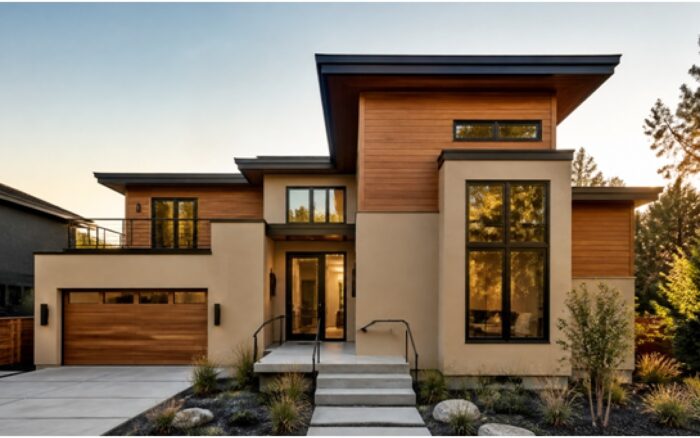
Exterior color is the single most expensive design decision most homeowners get wrong. A full repaint runs $3,000 to $10,000, and new siding or stone can climb well past $20,000 — yet the choice is often made from a two-inch paint chip held against a wall on a cloudy afternoon. The problem is scale and light: a color that looks like a soft greige indoors can read as flat gray on a north-facing wall or wash out to near-white in direct sun.
The fix is to see the finished result before you spend a dollar. AI facade tools now let you upload one photo of your house and generate a photorealistic version in a new color or material in about 30 seconds. Instead of imagining what “Sherwin-Williams Agreeable Gray with a charcoal roof” looks like on your home, you look at it. Tools like GenRoom take a single exterior shot and return a redesigned facade you can compare side by side — render, brick, board-and-batten siding, or natural stone — keeping your roofline, windows, and landscaping intact so the preview reflects your actual house, not a stock rendering.
How does AI let you preview your home’s facade in different colors?
You upload a photo of your house, pick a color or material, and the AI regenerates the facade photorealistically while preserving the structure. The result is a true-to-life image of your specific home — same roof pitch, same window placement, same driveway — repainted or reclad the way you asked.
This matters because exterior color behaves nothing like an indoor swatch. Sunlight, surrounding greenery, roof color, and your neighbors’ houses all shift how a shade reads. A preview built from your own photo captures that context. Practical ways homeowners use it:
- Test a whole palette fast. Body color, trim, front door, and shutters in one pass, then swap just the door to compare.
- Match a fixed element. Lock in the color that works with a roof or stone base you are not replacing.
- Compare materials, not just colors. See the same house as smooth render versus lap siding versus brick.
- Share with a spouse or HOA. A photoreal image settles debates that a paint name never will.
The cheapest way to avoid a $6,000 repainting mistake is to look at the finished wall before you buy the paint.
Which facade material is right for your home?
The right material balances the look you want, your climate, and your budget — there is no single best answer, but each option has a clear personality and trade-offs. Render (stucco) reads modern and seamless; brick reads classic and low-maintenance; fiber-cement siding is the flexible middle ground; natural stone is the premium accent. The table below compares the common choices.
| Material | Look | Pros |
| Render / stucco | Smooth, contemporary, monolithic | Seamless finish, wide color range, hides transitions |
| Brick | Traditional, textured, timeless | Extremely durable, low maintenance, strong resale appeal |
| Fiber-cement siding | Clean lap or board-and-batten lines | Fire-resistant, holds paint well, cost-effective |
| Natural stone | Rich, tactile, high-end accent | Premium curb appeal, ages gracefully, durable |
| Wood accents | Warm, natural, contemporary | Adds warmth, pairs well with render and dark trim |
A common winning move for U.S. homes is a mixed facade: render or siding on the main body with a stone or brick base and wood accents around the entry. That combination is exactly the kind of thing worth previewing, because the proportions are easy to get wrong on paper.
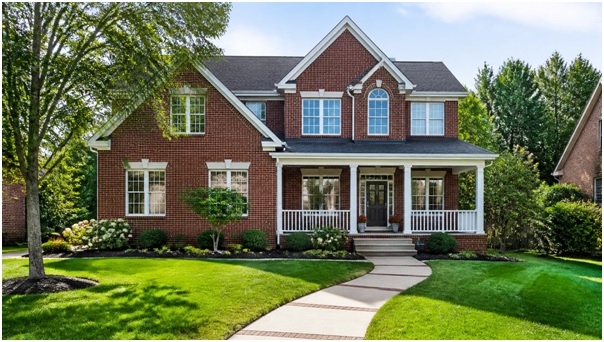
Brick reads timeless and resells well — but before you commit, it helps to see it against your own roofline and trim.
How accurate are AI facade previews?
AI previews are accurate enough for design decisions — color relationships, material combinations, and overall curb appeal — but they are visualization tools, not construction documents. The image shows you convincingly how a charcoal-and-wood scheme will feel on your home; it does not specify a paint SKU or a mortar joint.
Use the preview to narrow choices, then confirm with physical proof:
- Direction is reliable. Whether warm or cool tones suit your home, and whether brick beats siding, comes through clearly.
- Verify the exact shade in real light. Buy a sample pot and paint a two-foot square on the actual wall; check it at morning, noon, and dusk.
- Get quotes on the real material. Have a contractor price the specific product once the preview points you to a direction.
Treat the AI image as a high-fidelity mood board, not a spec sheet — it decides the direction, a sample pot confirms the shade.
What does it cost to preview your facade with AI?
Far less than one gallon of premium exterior paint. GenRoom offers free starter credits to try it, then paid plans start at $6.99 (Start), with Basic at $19.99 and Pro at $29.99. For a decision that steers a five-figure renovation, that is rounding error.
What you get across a typical facade tool:
- ~30-second turnaround per photorealistic redesign, so you can iterate through many options in one sitting.
- 50+ styles plus specific color and material control for exteriors.
- Up to 5 photos per project, an AI Editor for targeted tweaks, a Pro Model for higher fidelity, and 4K output for the version you present to a contractor.
- More than facades — the same tool handles interiors, yards, and virtual staging, useful if you are refreshing the whole property.
How to preview your facade step by step
Photograph the front of your house in even daylight, upload it, choose a color or material, and generate — then refine. The whole loop takes minutes, and the more straight-on your photo, the better the result.
- Shoot the facade straight-on in soft, even light, with the whole house in frame and minimal car or shadow clutter.
- Upload and pick a direction — a body color, a material like brick or render, or a full style.
- Generate and compare two or three options side by side.
- Refine with the AI Editor — swap just the door color or add a stone base without redoing everything.
- Export in 4K and take the winner to your painter or contractor for a real quote.
The Bottom Line
Exterior color and material choices are expensive to make and painful to reverse, and a paint chip simply cannot show you how a shade will behave across a whole wall in real light. Previewing your own house with an AI facade tool turns a guess into a decision you can see — compare render against brick, test a charcoal-and-wood palette, and settle the HOA debate before anyone buys a single gallon. Use it to lock in the direction, confirm the exact shade with a sample on the wall, and hand a 4K reference to your contractor. It costs less than a can of paint and can save you a five-figure mistake.
Frequently Asked Questions
Do I need a professional photo of my house?
No. A clear smartphone photo taken in even daylight works well. Aim for a straight-on angle with the full facade visible and avoid harsh midday shadows.
Can AI keep my roof and windows and only change the walls?
Yes. Good facade tools preserve your existing structure — roofline, windows, and landscaping — and change only the color or cladding, so the preview reflects your real home.
Will the AI give me the exact paint color name?
Not reliably. Use the preview to choose a direction, then match it to a real fan deck and test a sample pot on the wall before buying.
Can it show different materials, not just paint colors?
Yes. You can compare render, brick, fiber-cement siding, stone, and wood accents on the same house to see which suits it.
Does this replace an architect or contractor?
No. It is a visualization aid for color and material choices. Anything structural — new cladding installation, engineering, permits — still needs a licensed professional.